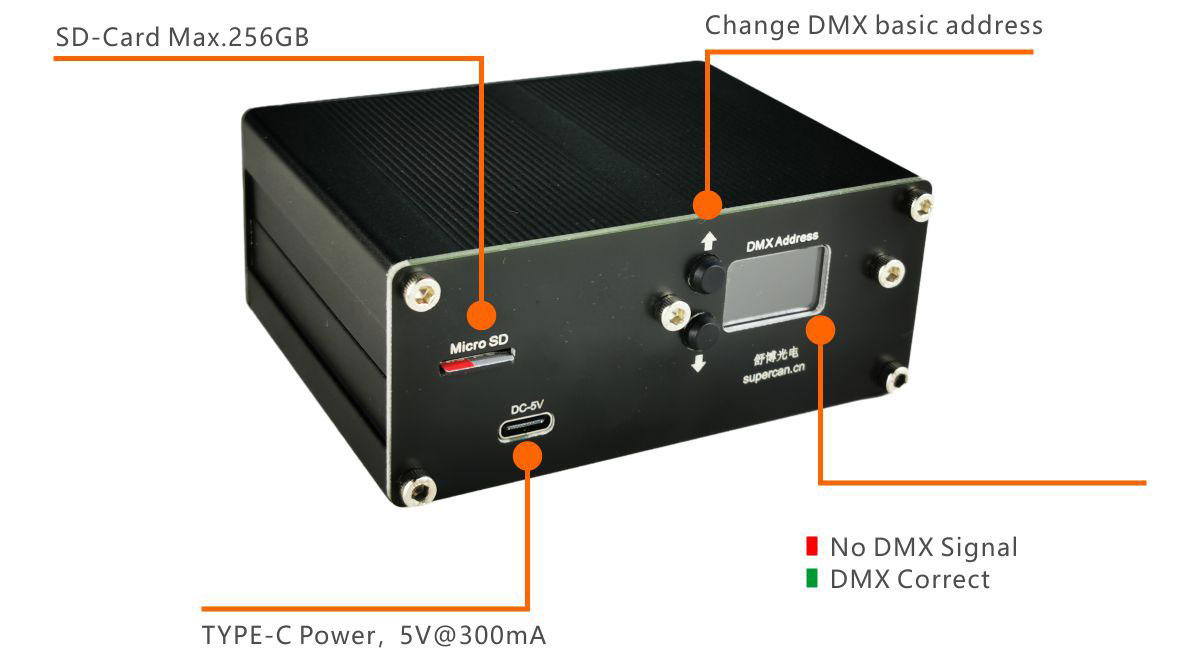
This online DMX simulator mirrors the real SUPERCAN HDMI V3 standalone DMX video player across both of its DMX-512 channels. Drag CH1 (or scroll the fader) to select a video file index from 1 to 255 — the on-screen monitor shows a deterministic preview for each index. Slide CH2 above 128 to loop the current file continuously, or keep it below 127 to fall back to blackout after one playthrough. Same channel allocation, same blackout-on-zero behavior, same one-fader cue logic as the HDMI V3 hardware running on stage. Use it to plan video cues without a console, demo the HDMI V3 workflow to a client, or check how a DMX rig will trigger your video playlist before you ship a board.
| CH | Function | Range |
|---|---|---|
| 1 | Video file index | 0 = Blackout · 1–255 = Select video file index |
| 2 | Loop / Blackout mode | 0–127 = Blackout after playback · 128–255 = Loop current file |
CH1 acts as your video-file selector — patch it to any console channel, fire a cue, the file index loads instantly with a frame-accurate cut. CH2 sets per-cue behavior so you can mix one-shot stings and looped backdrop content in the same show without scripting. The HDMI V3 firmware handles SD card playback up to 256 GB at 1080p over HDMI; this online DMX simulator emulates the trigger logic without the V3 hardware in the rack.
A typical stage setup wires the HDMI V3 into universe 1 (or any free universe) starting at the patch address of your choice — the example above patches CH1 → DMX 001 and CH2 → DMX 002. Pair the V3 with any DMX-512 lighting console, an SD card pre-loaded with your video assets, and an HDMI display chain. No laptop, no media server, no software stack — the V3 plays standalone the moment power and DMX hit the inputs. For larger-frame 2K (2560×1440) playback see the V82K 2K DMX HDMI video player.
Looking for the real HDMI V3 hardware? See the HDMI V3 product page for full specs and the four storage SKUs (No SD / 64 GB / 128 GB / 256 GB, from US$331), or browse the rest of our DMX-512 electronic modules.