Standalone DMX-Triggered HD Media Player — no PC, just XLR in, HDMI out
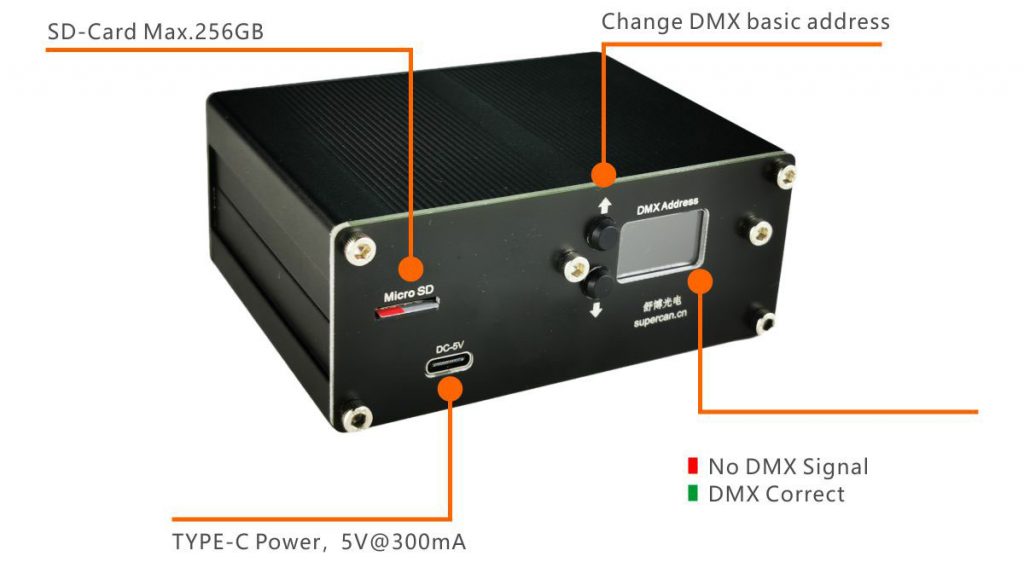
The V3 turns any DMX-512 lighting desk into a Full HD video server. Load clips onto an SD card, plug in XLR and HDMI, and your lighting operator can trigger 1920 × 1080 video — no PC, no video crew, no extra software.
- SD-card library — up to 256 GB, 255 clips per card.
- Address & status — set DMX start address on the built-in TFT screen.
- USB-C power — 5 V / 300 mA from any phone charger or USB hub.
- Clip selection from the console — pick any of 255 files directly from a DMX channel.
- Transport control — Play / Pause / Stop triggered by a single DMX slider.
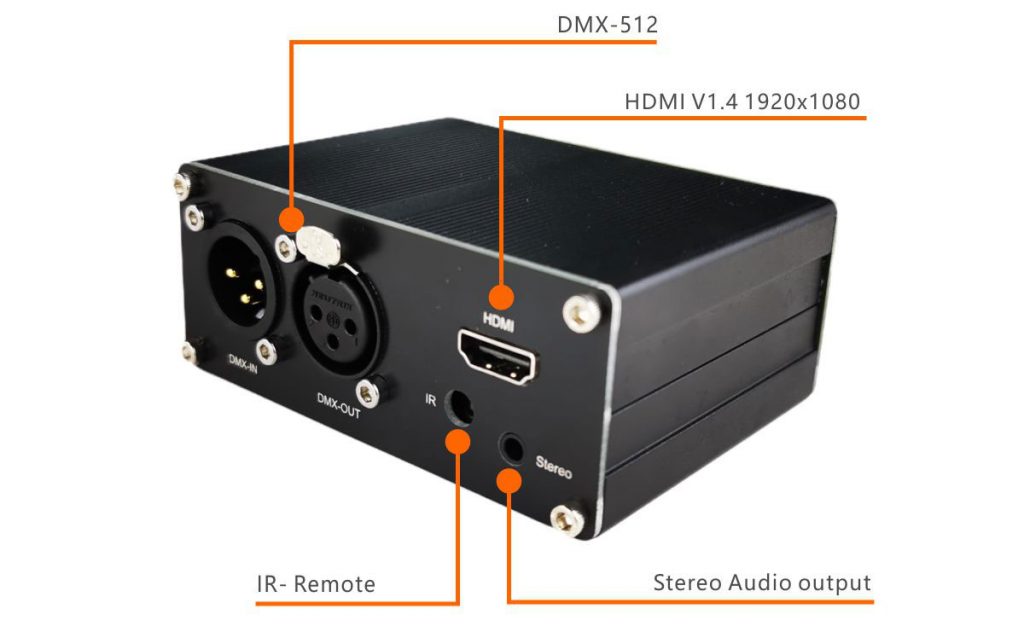
- Dual audio output — HDMI embedded audio or analog 3.5 mm TRS jack, with DMX-controlled volume (0–100%).
- HDMI 1.4 output — up to 1920 × 1080 @ 60 Hz to any screen, projector or LED processor.
- Standard DMX-512 input — 3-pin XLR, compatible with every major DMX-512 lighting console.
Specifications
| Control protocol | DMX-512 (3-pin XLR input) |
|---|---|
| Video output | HDMI 1.4, up to 1920 × 1080 @ 60 Hz |
| Audio output | HDMI embedded + analog 3.5 mm TRS stereo |
| Volume control | DMX-addressable (0–100%) |
| Storage | SD / SDHC / SDXC up to 256 GB, 255 files max |
| Display | Built-in colour TFT (DMX address & status) |
| Power | USB Type-C, 5 V / 300 mA (≈ 1.5 W) |
| Accepted formats | H.264 MP4 (use SUPERCAN Media Convert tool for guaranteed playback) |
Who uses the V3
- Stage & event LDs — fire synchronised lower-thirds and content loops straight from the lighting desk.
- Museums & immersive rooms — long-running installations that boot on power-on and run without a PC.
- Houses of worship — cue service graphics as a normal lighting scene.
- Retail & hospitality — drive shop-window LED screens from a DMX scheduler.
- Theme parks & escape rooms — tie video hits to show control without a dedicated video server.
Frequently Asked Questions
Which SD card should I use?
Class-10 SDHC/SDXC, 64–256 GB. Max 255 files per card.
Does it work with every DMX-512 console?
Yes — any console outputting standard DMX-512 over 3-pin XLR.
Maximum resolution?
Full HD 1920 × 1080 @ 60 Hz. For 2K/4K see the V82K model.
Can the lighting desk control volume?
Yes — volume is a DMX channel, fader-controlled 0–100%.
Will my existing MP4 files play?
In most cases yes. For guaranteed playback, run your clips through the SUPERCAN Media Convert tool (linked below).
Warranty & lead time?
12-month manufacturer warranty. Stock units ship in 3 working days by DHL / FedEx from Shenzhen; bulk orders 2–3 weeks.
Ready to order?
Tell us the quantity, destination country and show date — we’ll reply with a quote, shipping options and any matching accessories.
Request a Quote WhatsApp Linda
Also available: DMX HDMI Video Player V82K — 2K / 4K output
- DMX HDMI V3 User Manual (PDF)
-
Cover Drawing.pdf
-
Latest Firmware on Google Driver
-
Media convert tool v27.Dec.2024

Quick Media Convert tool now is available for download
Just drag your media file to the software, no matter audio file or video file.